

 Paper Submission
Speakers & Chair Guidelines
Paper Submission
Speakers & Chair Guidelines
Pacific Basin Nuclear Conference 2026
- In conjunction with KAP 2026
"Nuclear Energy for an AI-powered World"
"AI 기반 세상을 위한 원자력"
April 22-24, 2026 / Busan, Republic of Korea | BEXCO
Oral Session Guidelines
Poster Session Guidelines
Session Chair Guidelines
Registration Policy
- Registration is mandatory for all presenters.
- At least one author of each accepted abstract must:
- Complete registration
- Pay the conference fee - Only then will the paper be included in the official program.
- Online registration deadline: April 21, 2026
- Presenters are strongly encouraged to complete their registration by March 31 to ensure smooth conference operations.
- https://kapconf.com/register
Presentation Materials Submission
- Presentation materials must be submitted in PPT or PDF format.
- A 16:9 slide ratio is strongly recommended.
- Submission deadline: April 17, 2026
- Submission email: paper@kaif.or.kr
General Information
- Each presentation is allocated a total of 20 minutes (15 minutes presentation + 5 minutes Q&A).
- Q&A session will be held immediately following each presenter's presentation.
- Please be present in the session room and ready to begin on time, as the schedule is tight.
- Each presenter will be briefly introduced by the session chair.
- Please check your final presentation file in your designated room at the following times:
| Time | Presenter | Check point |
|---|---|---|
| 08:20 - 08:50 | Presenter 1-4 | Presentation file, badge |
| 10:20 - 10:40 | Presenter 1-4 | Presentation file, badge |
- Please confirm your presentation schedule.
Kapconf.com > Program > Technical session
https://kapconf.com/technical-session
- The registration booth is open from 08:00 to 14:00.
- The registration booth in front of the session hall closes at 14:00.
- For inquiries after 14:00, please contact the registration booth in front of the exhibition hall.
Presentation Preparation
- Please collect your badge at the registration booth.
- Presenters who have been issued a badge are requested to arrive at the designated session room at least 30 minutes before the start of the presentation and present their badge to the on-site staff to ensure a smooth presentation.
- The staff will verify the presentation schedule and materials and assist with uploading them.
- If there are any changes to the presentation materials, please save them to a USB memory stick and submit it to the designated session room before the presentation begins.
Audio-Visual Equipment in the Session Room
- Each session room is equipped with the following equipment:
- Laptop (operated by a technician at the control desk) running MS Office 2016 version or higher, operated in Windows 10, equipped with USB drive.
- A smart pointer, a mouse and a LCD monitor on the podium
- A timer under the front of the podium.
- One beam projector (HDMI) & One main screen.
How to Conduct a Presentation in the Session Room
- The speaker's seat is designated on the left side of the front row facing the podium and is marked “Next Speaker".
- Please sit in the “Next Speaker” seat and wait, then come up to the stage when it is your turn.
- Right before your presentation, the session chair will introduce you to the audience.
- When you stand on the podium, the first slide of your presentation will be projected on the podium screen and the session room screen.
- A timer is installed in front of the podium, and when you start your presentation, the time countdown begins and displays the remaining presentation time.
- You can use a wireless presenter to run the slides.
- If necessary, you can also use a mouse on the podium.
Considerations
- 1. All presenters must use only the equipment provided in the session room.
- Presentations using presenters' personal laptops are not permitted. - 2. The screen in the session room is optimized for a 16:9 ratio.
- 3. Presentation should be made in English (no simultaneous interpretation provided).
- 4. If you are using a font other than the Microsoft Office standard fonts, please import the font file itself along with the presentation file.
- 5. Additional monitors for viewing slide notes or presentation scripts are not provided.
- If you wish to refer to slide notes or scripts, please print them out and bring them with you.
Registration Policy
- Registration is mandatory for all presenters.
- At least one author of each accepted abstract must:
- Complete registration
- Pay the conference fee - Only then will the paper be included in the official program.
- Online registration deadline: April 21, 2026
- Authors are strongly encouraged to complete their registration by March 31 to ensure smooth conference operations.
- https://kapconf.com/register
Location and Schedule
Location: 1F Lobby, Convention Hall, BEXCO (https://kapconf.com/floor-plan)
Schedule:
| Time | Schedule | Check point |
|---|---|---|
| 17:00 - 20:00 | April 21 (Tue) | Installation |
| 08:00 ~ 09:00 | April 22 (Wed) | Installation |
| 09:00 - 20:00 | April 22 (Wed) ~ April 23 (Thu) | Display |
| 09:00 - 12:00 | April 24 (Fri) | Display |
| 12:00 ~ | April 24 (Fri) | Removal |
Poster Printing and Installation
- Poster printing and installation are the responsibility of the authors.
- Authors must print their posters in advance and install them personally at the designated poster boards during the assigned setup time.
- Posters must also be removed by the authors after the poster session ends.
- The organizing committee is not responsible for posters that are not removed after the session.
Poster Size and Submission
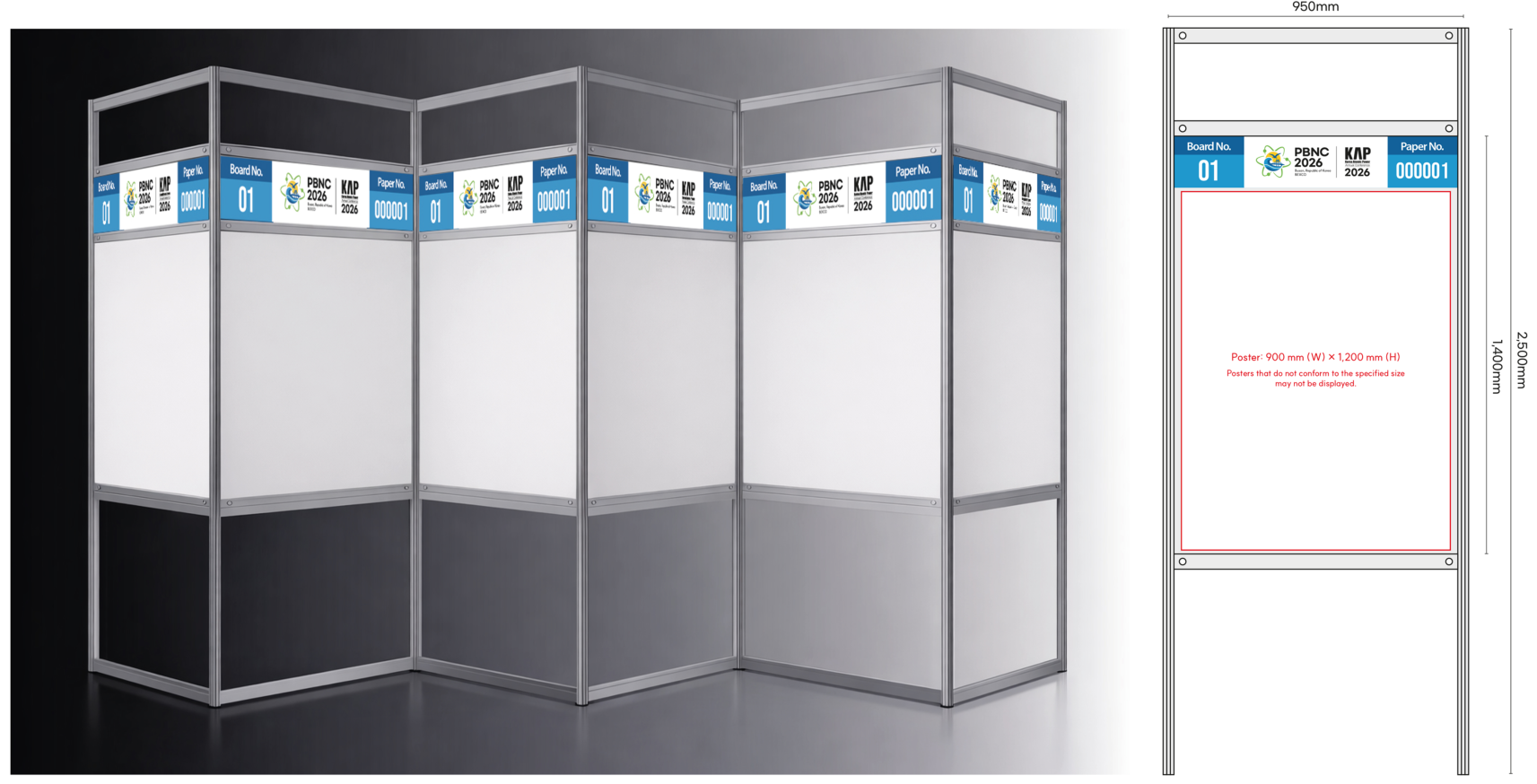
- The poster and panel sizes are specified as follows:
- Panel: 950 mm (W) × 2,500 mm (H)
- Poster: 900 mm (W) × 1,200 mm (H) - Posters that do not conform to the specified size may not be displayed.
- Posters must be created using the official template provided by the PBNC Secretariat and submitted by the designated deadline.
- Posters submitted without using the official template or after the deadline may not be approved for display.
- Final posters must be submitted in PDF format.
- Free to create content, please use a font size of 30 or higher.
- When inserting images, please use high-resolution files.
General Information
- Each session is 80 minutes long, with up to 4 presenters each having a 15-minute presentation and a 5-minute Q&A session.
| Time | Presenter | Duration Time |
|---|---|---|
| 08:20 - 08:50 | Presentation file Check & Break | 30" |
| 09:00 - 10:20 | Presenter 1-4 | 80" |
| 10:20 - 10:40 | Presentation file Check & Break | 20" |
| 10:40 - 12:00 | Presenter 1-4 | 80" |
- Please check the abstract and final papers submitted for your session in advance on the Technical session page before proceeding with the session.
- Please confirm presentation schedule.
Kapconf.com > Program > Technical session
https://kapconf.com/technical-session
Setting for Chair Desk
- Monitor on the desk and timer on the floor
- Name plate of session chairs
- Session chair guidelines (printed version)
- A bottle of water
- A bell
- Speaker's CV
Session Management
1. Before the Session
- Read and review the abstracts and final papers of the sessions designated in the Technical session
- https://kapconf.com/technical-session
- Please arrive at the session room approximately 10 min. before the session starts.
- Start the session on time.
- Briefly introduce yourself and welcome the participants to the session.
2. Before the Presentation
- Briefly introduce the presenter (name, organization and country) by referring to the provided CV and introduce the presentation title by referring to the Final Program Book.
3. During the Presentation
- Please manage each presentation so that it can be completed within the given time and check the timer frequently.
- When there is 1 minute left on the timer, please ring the bell on the desk and instruct the presenter to finish his/her presentation.
4. After the Presentation
- Please check the “Session Information” and proceed with Q&A according to each session.
- Please encourage questions from the audience, and if there are no questions from the audience, have the session chair ask questions directly to the presenter.
5. Closing the Session
- Please give a brief summary of the session.
- Please express your gratitude to the speakers and audience who participated in the session.
6. No-show Management
- If the presenter's absence is confirmed, the session room staff will notify the session chair of the fact.
- If you are notified by the session room staff that a presenter is absent, please inform the audience.
- Please do not bring forward the presentation time. Instead, keep the time blank and proceed with the session according to the existing schedule.
